Chop'd
Cook Kid-Friendly Meals With What You Already Have
Cook Kid-Friendly Meals With What You Already Have
(In-Progress App Design)
Turn on-hand ingredients into dinners your kids will actually eat.
Turn on-hand ingredients into dinners your kids will actually eat.
OVERVIEW
How Chop'd Came About
How Chop'd Came About
I built Chop’d after experimenting with AI at home and realizing it could solve a real weeknight problem: turning random fridge and pantry ingredients into dinner ideas my kids would actually eat, without defaulting to the same meals.
The goal was to
The goal was to
Generate kid-friendly dinner ideas from ingredients we already had
Reduce picky-eater friction with simple swaps and familiar flavors
Break out of the repetitive weeknight rotation
My Role
My Role
End-to-End no-code app design
DELIVER
Solution
Solution
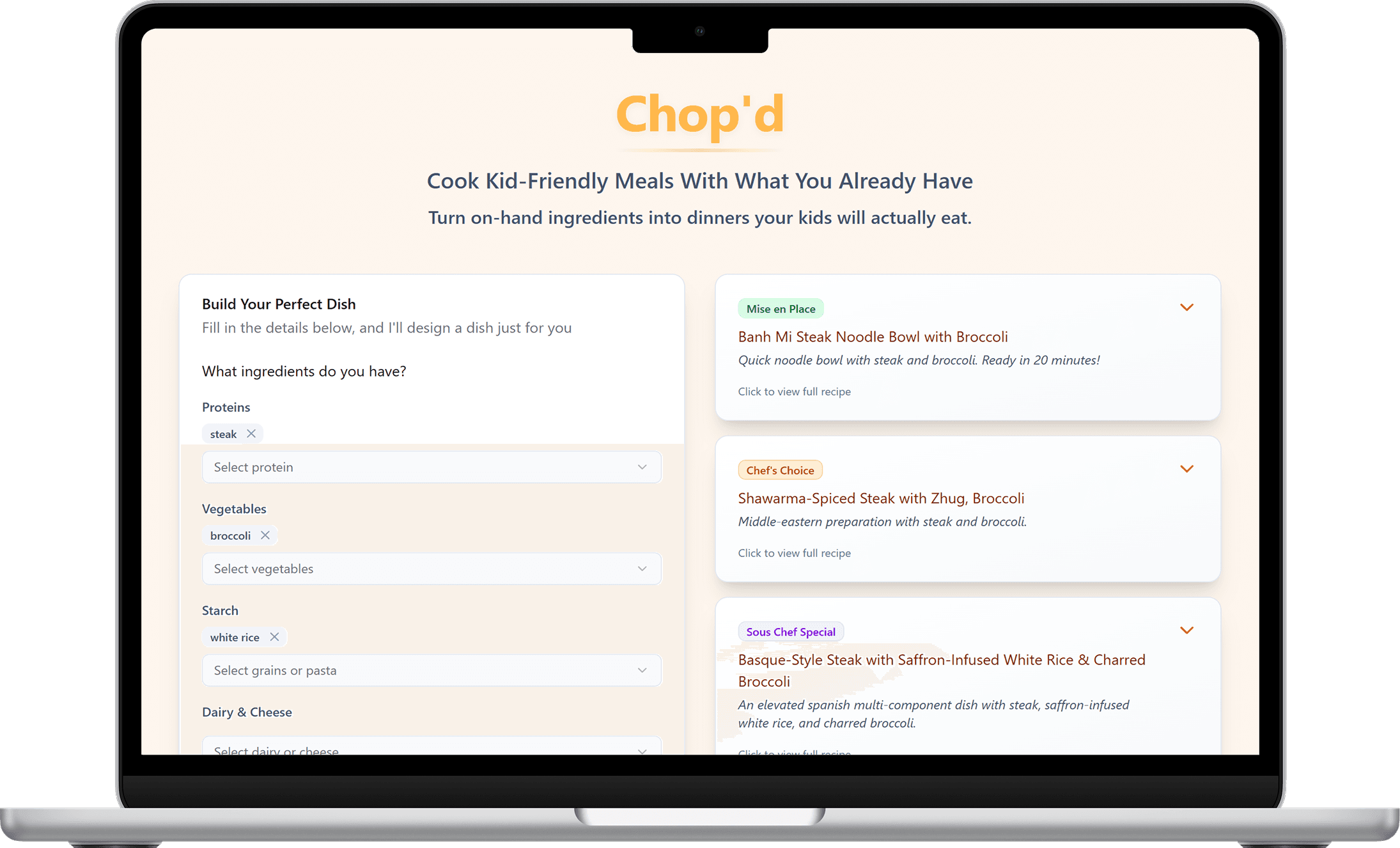
Chop’d was designed to answer the weeknight question fast: “What can I make with what we have that my kids will actually eat?” The experience keeps everything in one flow. Add ingredients, set picky-eater preferences, and instantly browse kid-friendly recipe cards with swaps, shortcuts, and clear steps. The goal is fewer decisions, less negotiation, and a dinner that gets finished.
1. Structured ingredient selection
What I did
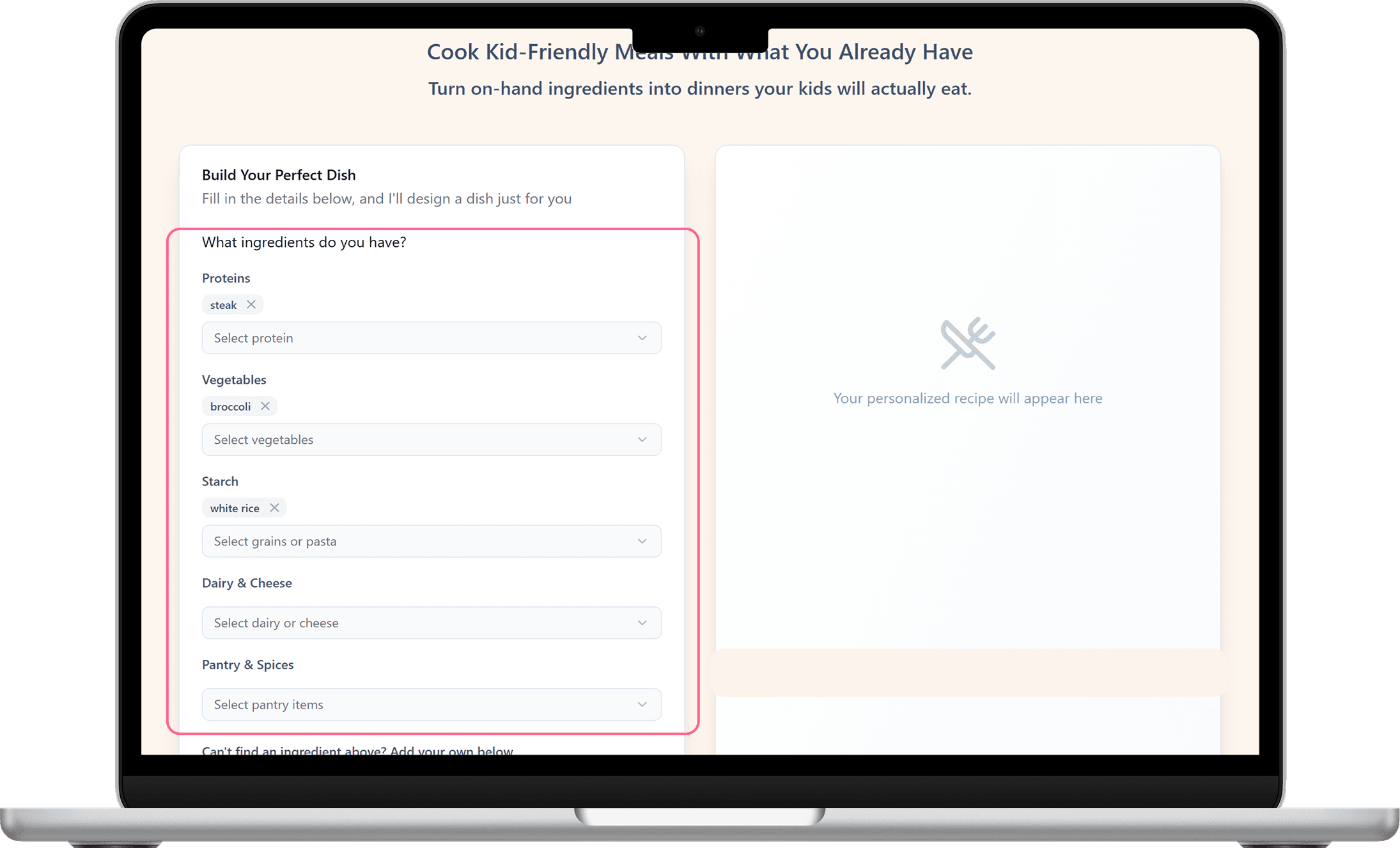
Built a dropdown-based ingredient picker grouped by category (Proteins, Veg, Fruits, Dairy, Pantry)
Enabled multi-select and quick edits to assemble an ingredient list fast
Why
Faster than typing and easier to scan
Reduces mistakes and keeps inputs consistent
Improves recipe relevance by capturing structured data
2. Edge-case support: custom ingredient entries
What I did
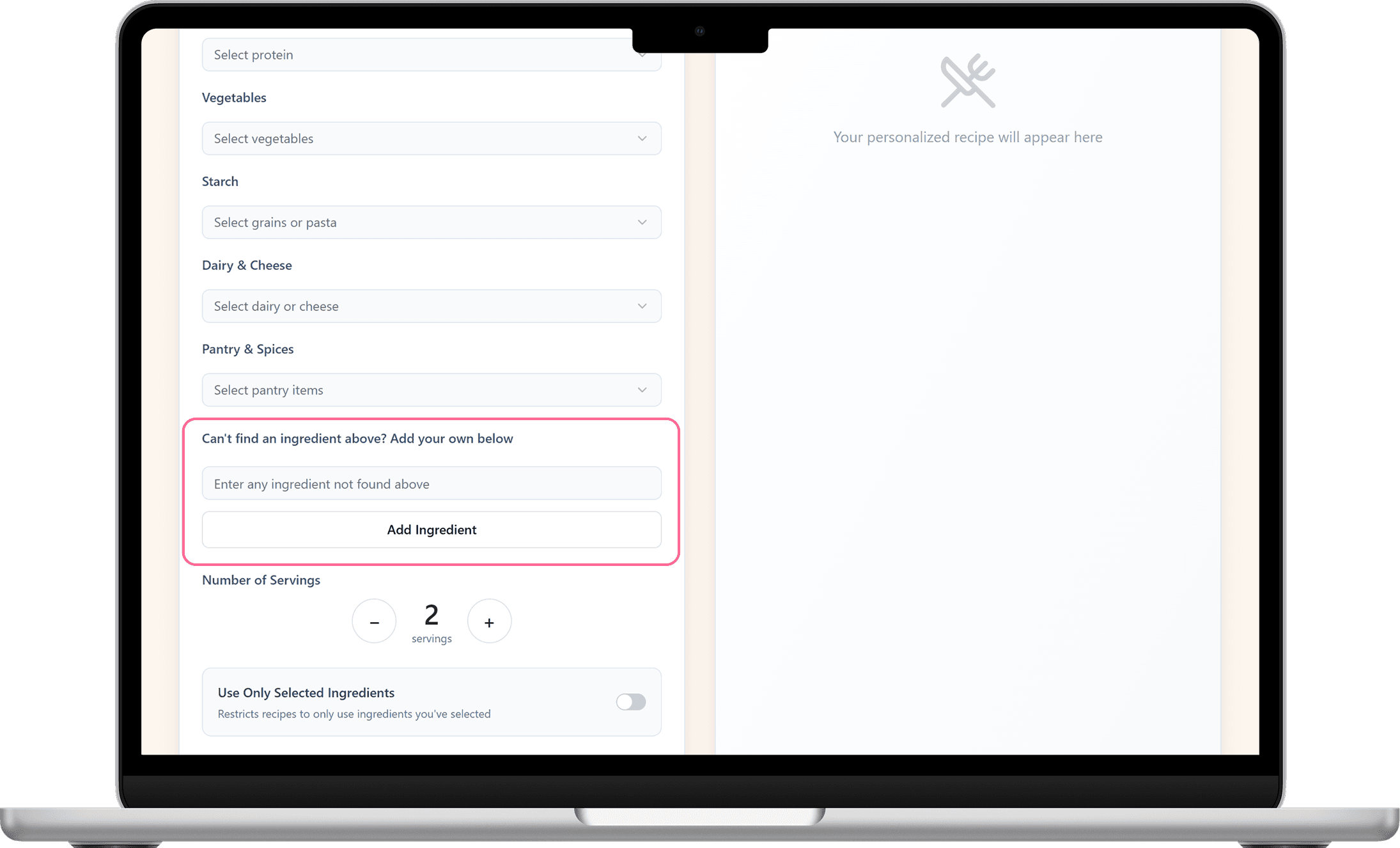
Added manual ingredient entry when dropdown options don’t match
Designed it as a quick “add and continue” interaction
Why
Captures long-tail ingredients without complicating the UI
Makes the experience feel more forgiving and complete
3. Gave users precision control
What I did
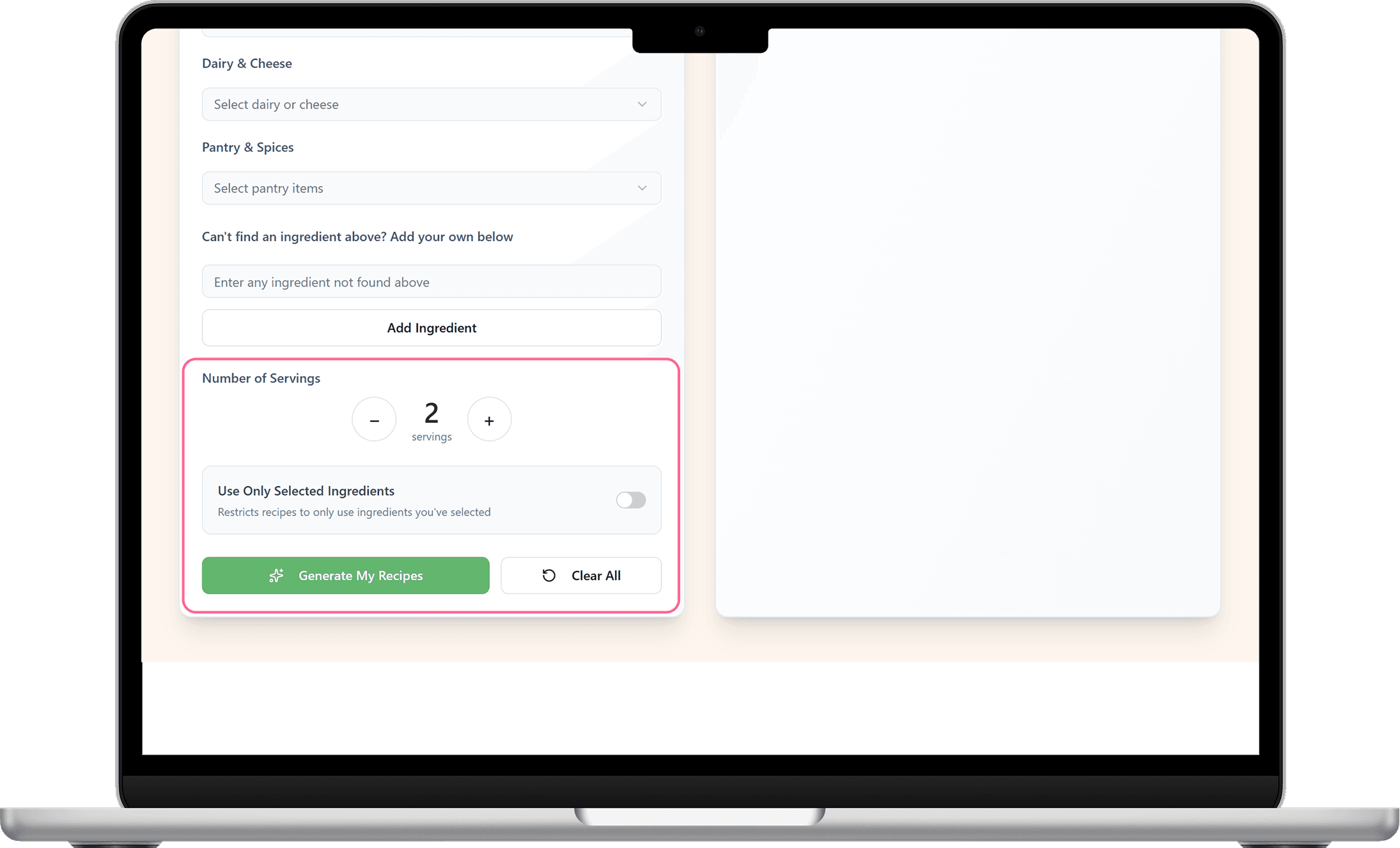
Added a servings stepper so users can scale recipes up or down
Included a toggle to restrict results to only selected ingredients
Kept controls grouped near the primary CTA for quick decision-making
Why
Helps families plan portions without mental math
Gives users control when they want to avoid extra ingredients
Improves trust by aligning results with what users actually have
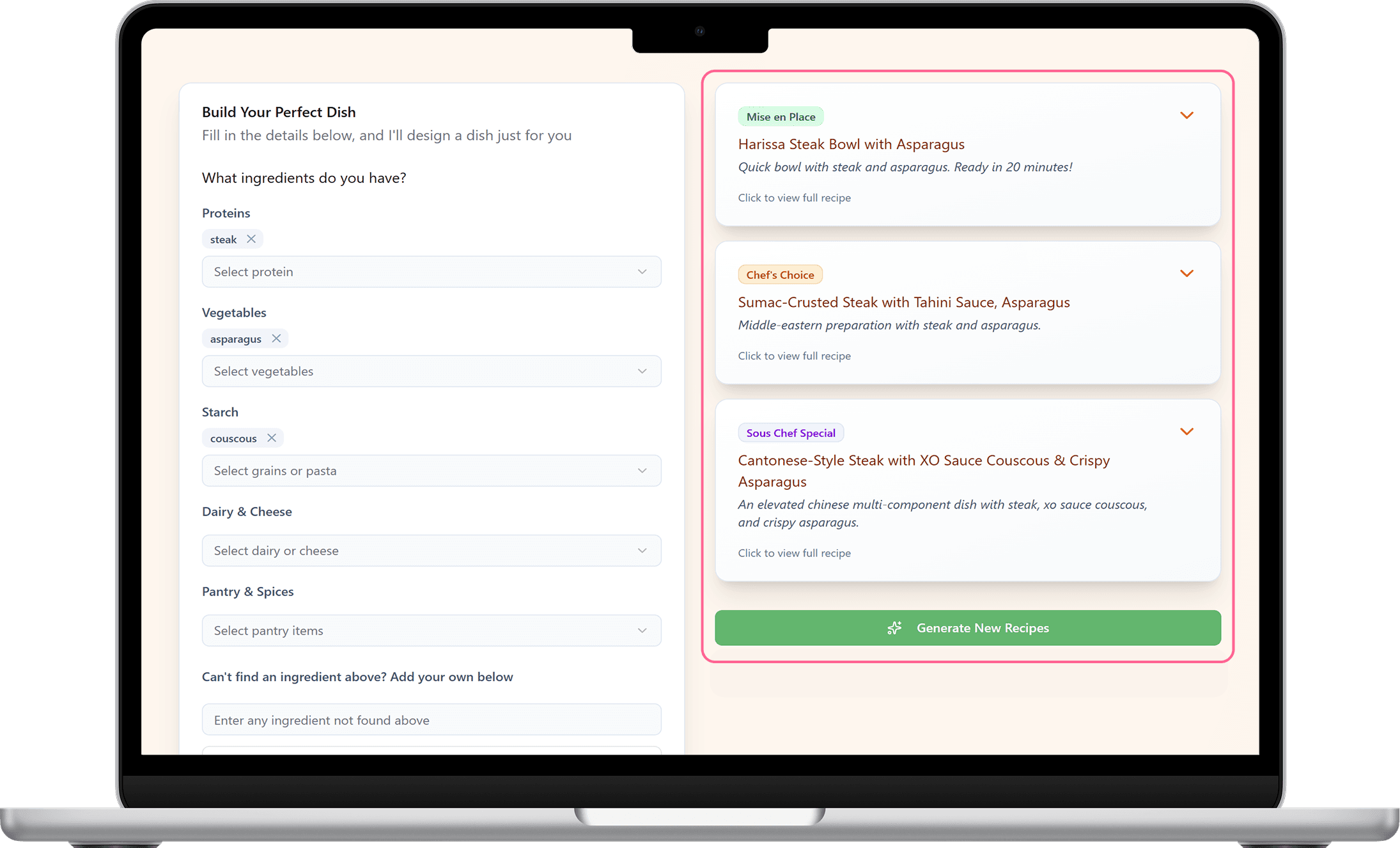
4. Tiered results by time + effort
What I did
Grouped results into three clear tiers (fast/simple → standard → more involved)
Used labels to set expectations before users open a recipe
Kept each card short with a preview line so scanning is effortless
Added a “Generate New Recipes” CTA so users can refresh results instantly without changing ingredients
Why
Lets users choose based on available time and energy
Reduces decision fatigue by narrowing options quickly
Encourages exploration when the first set isn’t a fit (taste, time, effort)
Makes the output feel curated and iterative rather than random
1. Structured ingredient selection
What I did
Built a dropdown-based ingredient picker grouped by category (Proteins, Veg, Fruits, Dairy, Pantry)
Enabled multi-select and quick edits to assemble an ingredient list fast
Why
Faster than typing and easier to scan
Reduces mistakes and keeps inputs consistent
Improves recipe relevance by capturing structured data
2. Edge-case support: custom ingredient entries
What I did
Added manual ingredient entry when dropdown options don’t match
Designed it as a quick “add and continue” interaction
Why
Captures long-tail ingredients without complicating the UI
Makes the experience feel more forgiving and complete
3. Gave users precision control
What I did
Added a servings stepper so users can scale recipes up or down
Included a toggle to restrict results to only selected ingredients
Kept controls grouped near the primary CTA for quick decision-making
Why
Helps families plan portions without mental math
Gives users control when they want to avoid extra ingredients
Improves trust by aligning results with what users actually have
4. Tiered results by time + effort
What I did
Grouped results into three clear tiers (fast/simple → standard → more involved)
Used labels to set expectations before users open a recipe
Kept each card short with a preview line so scanning is effortless
Added a “Generate New Recipes” CTA so users can refresh results instantly without changing ingredients
Why
Lets users choose based on available time and energy
Reduces decision fatigue by narrowing options quickly
Encourages exploration when the first set isn’t a fit (taste, time, effort)
Makes the output feel curated and iterative rather than random
1. Structured ingredient selection
What I did
Built a dropdown-based ingredient picker grouped by category (Proteins, Veg, Fruits, Dairy, Pantry)
Enabled multi-select and quick edits to assemble an ingredient list fast
Why
Faster than typing and easier to scan
Reduces mistakes and keeps inputs consistent
Improves recipe relevance by capturing structured data
2. Edge-case support: custom ingredient entries
What I did
Added manual ingredient entry when dropdown options don’t match
Designed it as a quick “add and continue” interaction
Why
Captures long-tail ingredients without complicating the UI
Makes the experience feel more forgiving and complete
3. Gave users precision control
What I did
Added a servings stepper so users can scale recipes up or down
Included a toggle to restrict results to only selected ingredients
Kept controls grouped near the primary CTA for quick decision-making
Why
Helps families plan portions without mental math
Gives users control when they want to avoid extra ingredients
Improves trust by aligning results with what users actually have
4. Tiered results by time + effort
What I did
Grouped results into three clear tiers (fast/simple → standard → more involved)
Used labels to set expectations before users open a recipe
Kept each card short with a preview line so scanning is effortless
Added a “Generate New Recipes” CTA so users can refresh results instantly without changing ingredients
Why
Lets users choose based on available time and energy
Reduces decision fatigue by narrowing options quickly
Encourages exploration when the first set isn’t a fit (taste, time, effort)
Makes the output feel curated and iterative rather than random
OVERVIEW
How the app uses AI to generate recipes
How the app uses AI to generate recipes
When a user picks ingredients, the app sends that list to a secure server (Supabase). That server asks OpenAI to create recipes based on what the user has, then sends the recipes back to the app to display.
Next steps to make the AI results more accurate
Next steps to make the AI results more accurate
To improve quality and relevance, the next steps are:
To improve quality and relevance, the next steps are:
Give the AI clearer rules (use the selected ingredients first, don’t add extras when “only selected ingredients” is on)
Keep the output consistent (every recipe includes the same basics: time, servings, ingredients, steps)
Add a quick safety check (if a recipe doesn’t match the ingredient rules, regenerate automatically)

Chop'd
Cook Kid-Friendly Meals With What You Already Have
(In-Progress App Design)
Turn on-hand ingredients into dinners your kids will actually eat.
OVERVIEW
How Chop'd Came About
I built Chop’d after experimenting with AI at home and realizing it could solve a real weeknight problem: turning random fridge and pantry ingredients into dinner ideas my kids would actually eat, without defaulting to the same meals.
The goal was to
Generate kid-friendly dinner ideas from ingredients we already had
Reduce picky-eater friction with simple swaps and familiar flavors
Break out of the repetitive weeknight rotation
My Role
End-to-End no-code app design
DELIVER
Solution
Chop’d was designed to answer the weeknight question fast: “What can I make with what we have that my kids will actually eat?” The experience keeps everything in one flow. Add ingredients, set picky-eater preferences, and instantly browse kid-friendly recipe cards with swaps, shortcuts, and clear steps. The goal is fewer decisions, less negotiation, and a dinner that gets finished.
1. Structured ingredient selection
What I did
Built a dropdown-based ingredient picker grouped by category (Proteins, Veg, Fruits, Dairy, Pantry)
Enabled multi-select and quick edits to assemble an ingredient list fast
Why
Faster than typing and easier to scan
Reduces mistakes and keeps inputs consistent
Improves recipe relevance by capturing structured data
2. Edge-case support: custom ingredient entries
What I did
Added manual ingredient entry when dropdown options don’t match
Designed it as a quick “add and continue” interaction
Why
Captures long-tail ingredients without complicating the UI
Makes the experience feel more forgiving and complete
3. Gave users precision control
What I did
Added a servings stepper so users can scale recipes up or down
Included a toggle to restrict results to only selected ingredients
Kept controls grouped near the primary CTA for quick decision-making
Why
Helps families plan portions without mental math
Gives users control when they want to avoid extra ingredients
Improves trust by aligning results with what users actually have
4. Tiered results by time + effort
What I did
Grouped results into three clear tiers (fast/simple → standard → more involved)
Used labels to set expectations before users open a recipe
Kept each card short with a preview line so scanning is effortless
Added a “Generate New Recipes” CTA so users can refresh results instantly without changing ingredients
Why
Lets users choose based on available time and energy
Reduces decision fatigue by narrowing options quickly
Encourages exploration when the first set isn’t a fit (taste, time, effort)
Makes the output feel curated and iterative rather than random
1. Structured ingredient selection
What I did
Built a dropdown-based ingredient picker grouped by category (Proteins, Veg, Fruits, Dairy, Pantry)
Enabled multi-select and quick edits to assemble an ingredient list fast
Why
Faster than typing and easier to scan
Reduces mistakes and keeps inputs consistent
Improves recipe relevance by capturing structured data
2. Edge-case support: custom ingredient entries
What I did
Added manual ingredient entry when dropdown options don’t match
Designed it as a quick “add and continue” interaction
Why
Captures long-tail ingredients without complicating the UI
Makes the experience feel more forgiving and complete
3. Gave users precision control
What I did
Added a servings stepper so users can scale recipes up or down
Included a toggle to restrict results to only selected ingredients
Kept controls grouped near the primary CTA for quick decision-making
Why
Helps families plan portions without mental math
Gives users control when they want to avoid extra ingredients
Improves trust by aligning results with what users actually have
4. Tiered results by time + effort
What I did
Grouped results into three clear tiers (fast/simple → standard → more involved)
Used labels to set expectations before users open a recipe
Kept each card short with a preview line so scanning is effortless
Added a “Generate New Recipes” CTA so users can refresh results instantly without changing ingredients
Why
Lets users choose based on available time and energy
Reduces decision fatigue by narrowing options quickly
Encourages exploration when the first set isn’t a fit (taste, time, effort)
Makes the output feel curated and iterative rather than random
1. Structured ingredient selection
What I did
Built a dropdown-based ingredient picker grouped by category (Proteins, Veg, Fruits, Dairy, Pantry)
Enabled multi-select and quick edits to assemble an ingredient list fast
Why
Faster than typing and easier to scan
Reduces mistakes and keeps inputs consistent
Improves recipe relevance by capturing structured data
2. Edge-case support: custom ingredient entries
What I did
Added manual ingredient entry when dropdown options don’t match
Designed it as a quick “add and continue” interaction
Why
Captures long-tail ingredients without complicating the UI
Makes the experience feel more forgiving and complete
3. Gave users precision control
What I did
Added a servings stepper so users can scale recipes up or down
Included a toggle to restrict results to only selected ingredients
Kept controls grouped near the primary CTA for quick decision-making
Why
Helps families plan portions without mental math
Gives users control when they want to avoid extra ingredients
Improves trust by aligning results with what users actually have
4. Tiered results by time + effort
What I did
Grouped results into three clear tiers (fast/simple → standard → more involved)
Used labels to set expectations before users open a recipe
Kept each card short with a preview line so scanning is effortless
Added a “Generate New Recipes” CTA so users can refresh results instantly without changing ingredients
Why
Lets users choose based on available time and energy
Reduces decision fatigue by narrowing options quickly
Encourages exploration when the first set isn’t a fit (taste, time, effort)
Makes the output feel curated and iterative rather than random
OVERVIEW
How the app uses AI to generate recipes
When a user picks ingredients, the app sends that list to a secure server (Supabase). That server asks OpenAI to create recipes based on what the user has, then sends the recipes back to the app to display.
Next steps to make the AI results more accurate
To improve quality and relevance, the next steps are:
Give the AI clearer rules (use the selected ingredients first, don’t add extras when “only selected ingredients” is on)
Keep the output consistent (every recipe includes the same basics: time, servings, ingredients, steps)
Add a quick safety check (if a recipe doesn’t match the ingredient rules, regenerate automatically)